


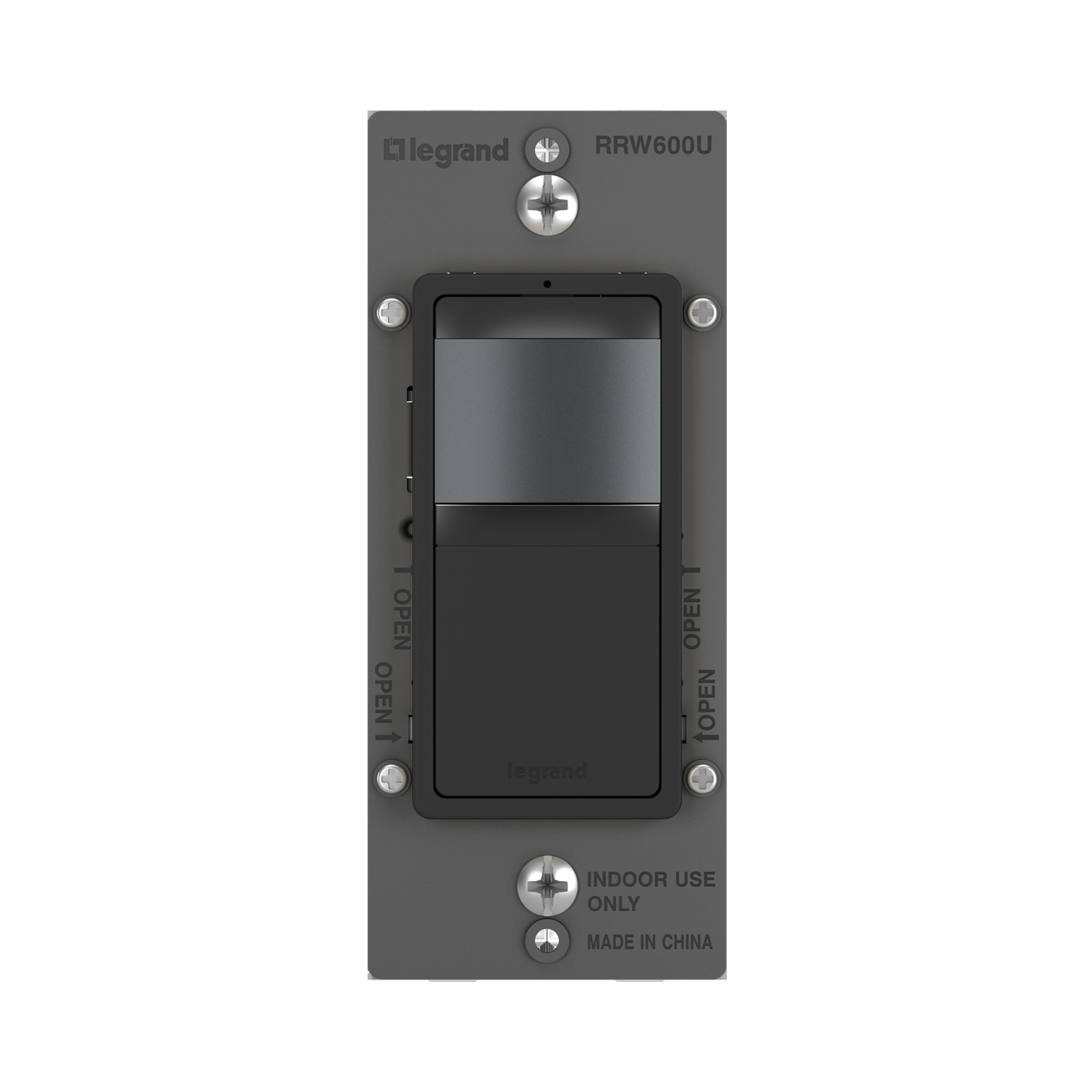


radiant® Single Pole 3-Way Occupancy Sensor, Black
RRW600UBK
radiant Collection
radiant® Single Pole 3-Way Occupancy Sensor, White is rated
out of
5 by
28.
Bazaarvoice SAP Hybris Integration Version 2.8.1
Simplify control while saving energy, with the radiant® Occupancy Sensor. Automatically turning the light on when someone enters a room, and shutting it off when the room is empty, this sensor includes an adjustable timed delay for shut off, as well as additional settings for more flexible control. Part of the radiant® Collection, it features clean lines and smooth paddle action for a sophisticated touch. Made exclusively for use with screwless Wall Plates from the radiant® Collection, sold separately.
- Send
- Save as PDF
-
Added to Favorites Go to favoritesRemove from favorites?Something went wrong. Please try again later.
Features
- Passive infrared (PIR) sensor switch technology with 180° coverage up to 600 sq. ft. Rated for up to 600W (5A) of LED lighting.
- Works with virtually any bulb/fixture, including: LED, incandescent, fluorescent, compact fluorescent (CFL), magnetic low-voltage (MLV) and electronic low-voltage (ELV), 1/6 hp.
- Turn the light on when you enter, and let it turn itself off automatically after you leave for true convenience. Perfect for bathrooms, hallways, closets, garages, and more.
- Locator light illuminates when switch is off, emitting a soft glow to help you find it in the dark.
- Features an adjustable time delay to off after no motion is detected. Delay settings range from 30 seconds to 20 minutes after the room is vacated (default 5 minute delay).
- Auto ON/Auto OFF functionality as default. Easily configurable to Manual ON/Auto OFF to meet any need or preference in the home.
- Replace any basic light or fan switch in 15 minutes or less. Supports single pole and multi-location installs. No neutral required.
- Complete the look with a sleek, screwless radiant® Wall Plate, and coordinate with other designer switches and outlets available from the radiant® Collection.
- More color options available to fit any style, including finishes to match current hardware and lighting trends.
- Wire leads accept #14–#10 AWG solid & stranded wire, copper-clad aluminum, and copper wire.
Specifications
General Info
| Color | Black | ||
| Product Type | Sensor, Wall Switch | ||
| Material | Polycarbonate, Steel | ||
| Finish | Satin | ||
| Application Sector | Hospitality, Light Commercial, Multi-Dwelling Unit, Residential | ||
| Product Line | Pass & Seymour | ||
| Country Of Origin | China | ||
| Features | Adjustable Time Delay, Motion Sensor | ||
| Installation Location | Wall Box | ||
| Switch Type | Motion Sensor, sofTap | ||
| Warranty Type | Limited Lifetime Warranty | ||
| UPC Number | 785007446432 |
Dimensions
| Product Depth US | 1.88 in | ||
| Product Height US | 2.63 in | ||
| Product Width US | 1.69 in |
Listing Agencies / 3rd Party Agencies
| cULus ListingNumber | E95442 | ||
| cULus Listed | Yes |
Technical Information
| On Function | Selectable Auto/Manual | ||
| Requires Neutral Wire | No | ||
| Wire Connection Type | Flying Leads | ||
| Indoor/Outdoor | Indoor | ||
| Input Voltage | 120 VAC | ||
| Line Frequency | 60 Hz | ||
| Load Rating | 120V 5A (ELV), 120V 5A 600W (CFL), 120V 5A 600W (LED), 120V 600VA (Fluorescent), 120V 600VA (MLV), 120V 600W (Halogen), 120V 600W (Incandescent) | ||
| Load Type | CFL, Fan Motor, Fluorescent, Halogen, Incandescent, LED | ||
| Location Rating | Dry | ||
| Mounting Type | Wall Box | ||
| Number of Poles | Multi-Location, Single Pole 3 Way | ||
| Timer Duration | 30 Seconds-20 Minutes, 5 Minutes | ||
| Operating Humidity | 0-95% RH (Non-Condensing) | ||
| Horsepower Rating | 1/6 HP @ 120 VAC | ||
| Response Frequency | 60 Hz | ||
| Sensing Range | Major Motion 35 ft, Minor Motion 20 ft | ||
| Sensitivity | 60Hz | ||
| Sensor Type | Occupancy, Vacancy | ||
| Sensor Technology | Passive Infrared (PIR) | ||
| Sensor Coverage | 600 sq ft | ||
| Sensor Coverage Pattern | 180 ° | ||
| Target Size | 180 deg | ||
| Voltage | 120 VAC | ||
| Wattage | 600 W | ||
| Wire Size | #14 - #10 AWG |
Resources
Specifications
Supporting Document
Cutsheet
Reviews
Rated 5 out of
5
by
Charles 1547 from
"You must unlearn what you have learned." -Yoda
Recently purchased one of these switches on sale from Amazon. As others have pointed out, the instructions are not as intuitive as they could be. But, the diagrams for connecting the wires for all possible configurations is very straight forward.
Black goes to the incoming hot or feed for all scenarios, red for the load, yellow is the signal wire for other radiant timers (or one of the "travelers" in 3-way configs, they call it the "runner"), white goes to neutral, and the ground screw for your equipment grounding conductor.
The single pole configuration is much easier to work with because it's pretty standard, whereas the 3-way is not traditional by any means. This is where Yoda's wise words directly apply. You are required to know which wires are your incoming hot and outgoing load, especially for 3-way retrofitting applications. This will save you time, because you may need to use the now spare "traveler" as the means for bringing connection to either your feed or load to the radiant timer. What was very surprising to me was the use of the common, on a paired 3-way switch, to be grounded per their instructions. It left me wondering if using the circuit neutral, the grounded conductor, would suffice or if the equipment grounding conductor is the only conductor permitted; I used the EGC and it worked as intended. *Always follow the manufacturer's instructions*
As a licensed electrician, I appreciate that there is only one way to install and program this device through the instructions. Very easy to catch a mistake this way. These installation instructions coupled with the programming of the device are very much to the "T" and leave no room for error. I actually had to use a timer during the programming phase to initiate the time-delay and initiate occupancy mode; would recommend since you can overshoot on your own phyiscal count. Using the charts for the desired functions was easy with the blinking LED as a reference for each setting present and just pressing the button to move on to the next.
I would not consider this an easy switch for those just looking to plug-and-play but it does what it was designed to do. If you follow the instructions, it will work. I will be buying more of these to install on other projects in the future.
Date published: 2022-08-26
Rated 3 out of
5
by
GSBJackson from
Poor Instructions
I was this close to returning to Lowe’s before coming on this site to learn that the brown wire is not needed. After eliminating that wire, it worked like a champ. I also learned that their is no manual On/Off, only manual On. My wife is going to have fits with that limitation. May be going back anyway.
Date published: 2019-12-02
Rated 1 out of
5
by
tarded from
Super frustrating.
I've spent 4 hours and no luck. There are no instructions on how to wire as a 3 way switch. If I could give it 0 star I would. Waste of my time and money.
Date published: 2020-05-13
Rated 1 out of
5
by
John from
Poor instructions
This faux "switch" comes with RED/BLACK/YELLOW wires. The instructions do no not clearly state what the yellow wire is for. Found out that you can not use it to turn off the light/fan. You need to wait until it runs its cycle of 1/5/10 mins etc. Bought at Lowes - Will be returning it.
Date published: 2019-03-12
Rated 1 out of
5
by
10Driver from
Lousy instructions...
The instructions do not properly address what to do with the existing wires. For example, when wiring to a second Sensor switch in a 3-way circuit, nothing is mentioned about the second black runner wire. The first runner is connected to the yellow wire on the switch which is then connected to the yellow wire on the second switch. The red switch wire is not connect and capped. The Line wire is connected to the black wire on the switch but what do you do with the second runner wire?
Cannot get the switches to work as shown.
Date published: 2020-07-07
Bazaarvoice SAP Hybris Integration Version 2.8.1
Questions & Answers
i adjusted my rrw600utc to 5 minutes and now it times out, turns off for 1 second and turns back on and keeps doing that
Thank you for your inquiry. To provide further assistance with your request, we require additional information. Please get in touch with Legrand Pass & Seymour Technical Support at (800) 223-4185 between 8:00 a.m. and 6:00 p.m. EST, or via email at Tech.Support@legrand.us.
Date published: 2024-08-12
By the diagram, it looks like there are 2 motion sensors on this switch - one for close range and one for long range. The longer range sensor will pick up motion past the door into the next room. Is there a way to mask or set sensitivity for the sensor?
Thank you for reaching out. The RRW600UTC sensor can be programmed as either an Occupancy or Vacancy sensor. However, it does not offer a feature to adjust sensitivity or coverage range.
Date published: 2025-12-03
where can I get a wiring diagram for Legrand RRW600U?
Thank you for your inquiry. You can locate the installation instructions on the product landing page for part number RRW600UTC in the Resources section.
If you have any other questions or comments, please get in touch with us at (800) 223-4185 8:00 a.m. – 6:00 p.m. EST.
Best Regards,
Technical Support
Date published: 2024-04-15
Occupancy mode in instructions says RRW600U allows the load to be turned ON manually as well, and turn OFF automatically at the desired time delay. In my 3-way switch installation pressing either switch without motion detected does not turn on light.
Occupancy mode operates in an "Auto on/Auto off" fashion. You can press the manual button to turn the load on or off as desired. If you're having trouble manually operating the device, it's likely an issue with the installation. Please contact us in Technical Support so we can help you.
844-957-3783
M - F | 8 - 6p ET
Date published: 2023-08-09
Does this sensor have a setting to recognize ambient light? In a room with plenty of light during the day it seems un-necessary for a light to come on all the time. I have seen some competitors that advertise their switch recognizes ambient light
This particular model doesn't offer an ambient light sensor.
Date published: 2023-03-21
I have a split entry. The foyer light is controlled with one switch in the foyer, one switch at the bottom of the stairs, and one at the top of the stairs. I in stalled the sensor in the foyer for obvious reasons, but It does not operate as expected
I’ve thought this through, and I think this should work in a 4way circuit. Wire as legrand prescribes to the three way but then run the two poles from that three way to the 4 way and terminate the other half of the four way to nc and ground. That should work and the legrand engineers should be ashamed if it works, don’t see how it wouldn’t.
Date published: 2023-03-08
On wiring sensor switch to replace a single on off switch to a light,where does the black wire go,where does the red wire go and where does the blue and white stripe wire go?
Hello Jerry,
Please contact Pass & Seymour Technical Support for further assistance with your request.
Pass & Seymour Technical Support
Phone #: 800-223-4185
Monday - Friday | 8:00 am - 6:00 pm Eastern Standard Time (excluding holidays)
Best Regards,
Technical Support
Date published: 2023-03-06
in a 3-way application, I put this on one terminal, then what do I need to pair it with? the same type of switch (3-way with sensor), or a regular 3-way switch with no sensor?
This device can be used in single or multilocation applications. For a three way installation, you could use either (2) sensors or (1) sensor and 1 three way switch.
Date published: 2024-08-21
Bazaarvoice SAP Hybris Integration Version 2.8.1
Recently Viewed
Added to Favorites
Go to favorites
Remove from favorites?
Something went wrong. Please try again later.

4ATP2RBK | Wiremold
Designed for retrofit and new construction, Evolution Series 4" Recessed Poke-Thru devices provide convenient access to power, communications, and audio/video services recessed below floor level